
28. Create a custom block#
In this part you will create a new block for the Volto frontend.
Check out mastering-plone-project at tag sponsors:
git checkout sponsors
The code at the end of the chapter:
git checkout block
More info in The code for the training
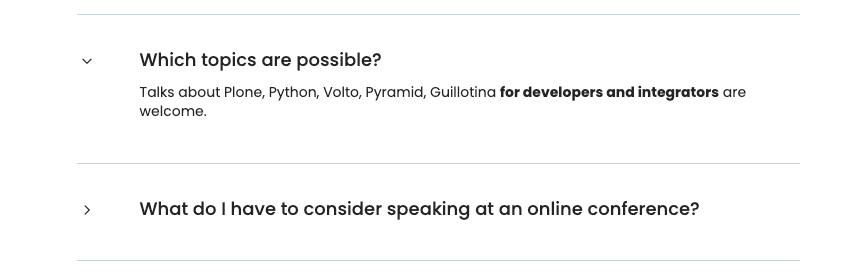
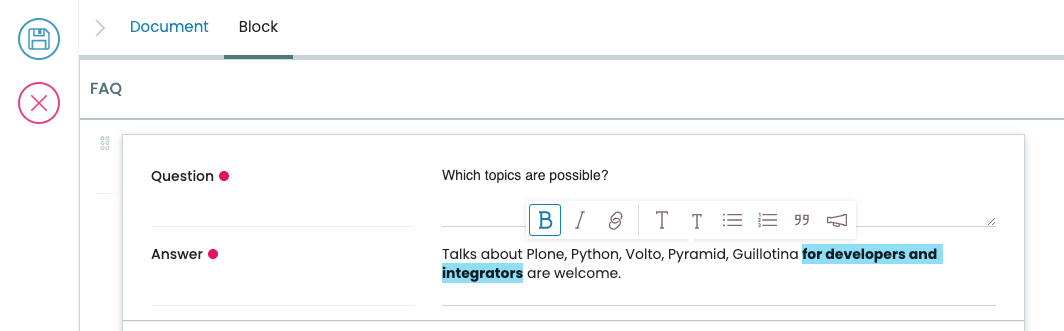
We want to provide some information for speakers of the conference: Which topics are possible? What do I have to consider for speaking at an online conference? A FAQ section would come in handy. This could be done by creating a block type that offers a form for question and answer pairs and displays an accordion.
28.1. The block schema#
Let's first define the schema for the data that will be stored for this block. We want to store a list of question and answer pairs, like this:
[
  {
    "question": "What is Plone?",
    "answer": "Plone is a CMS..."
  },
  {
    "question": "Where is the conference?",
    "answer": "Maastricht"
  }
]
Create a folder src/frontend/volto-ploneconf-site/src/components/Blocks/FAQ containing schema.js.
 1export const QuestionAnswerPairSchema = {
 2  title: 'Question and Answer Pair',
 3  fieldsets: [
 4    {
 5      id: 'default',
 6      title: 'QA pair',
 7      fields: ['question', 'answer'],
 8    },
 9  ],
10  properties: {
11    question: {
12      title: 'Question',
13      type: 'string',
14      widget: 'textarea',
15    },
16    answer: {
17      title: 'Answer',
18      type: 'string',
19      widget: 'richtext',
20    },
21  },
22  required: ['question', 'answer'],
23};
24
25export const FAQBlockSchema = {
26  title: 'FAQ',
27  fieldsets: [
28    {
29      id: 'default',
30      title: 'Default',
31      fields: ['faqs'],
32    },
33  ],
34  properties: {
35    faqs: {
36      title: 'Question and Answers',
37      type: 'array',
38      widget: 'object_list',
39      schema: QuestionAnswerPairSchema,
40    },
41  },
42  required: [],
43};
QuestionAnswerPairSchema is the schema for a single question-answer pair, and FAQBlockSchema is the schema for the entire block, with a list of those pairs.
28.2. Block view#
We need a view for the block. The BlockView is a simple function component that displays a FAQ component with the data stored in the block.
Create the file src/frontend/volto-ploneconf-site/src/components/Blocks/FAQ/BlockView.jsx.
 1import FAQ from './FAQ';
 2
 3const View = ({ data }) => {
 4  return (
 5    <div className="block faq">
 6      <FAQ data={data} />
 7    </div>
 8  );
 9};
10
11export default View;
We outsource the FAQ component to file src/packages/volto-ploneconf-site/src/components/Blocks/FAQ/FAQ.jsx and make heavy use of Semantic UI components, especially the accordion with its behavior of expanding and collapsing.
 1import { useState } from 'react';
 2
 3import Icon from '@plone/volto/components/theme/Icon/Icon';
 4import rightSVG from '@plone/volto/icons/right-key.svg';
 5import downSVG from '@plone/volto/icons/down-key.svg';
 6import AnimateHeight from 'react-animate-height';
 7
 8import { Accordion, Grid, Divider, Header } from 'semantic-ui-react';
 9
10const FAQ = ({ data }) => {
11  const [activeIndex, setActiveIndex] = useState(new Set());
12
13  return data.faqs ? (
14    <>
15      <Divider section />
16      {data.faqs.map(({ '@id': id, question, answer }) => (
17        <Accordion key={id} fluid exclusive={false}>
18          <Accordion.Title
19            index={id}
20            className="stretched row"
21            active={activeIndex.has(id)}
22            onClick={() => {
23              const newSet = new Set(activeIndex);
24              activeIndex.has(id) ? newSet.delete(id) : newSet.add(id);
25              setActiveIndex(newSet);
26            }}
27          >
28            <Grid>
29              <Grid.Row>
30                <Grid.Column width="1">
31                  {activeIndex.has(id) ? (
32                    <Icon name={downSVG} size="20px" />
33                  ) : (
34                    <Icon name={rightSVG} size="20px" />
35                  )}
36                </Grid.Column>
37                <Grid.Column width="11">
38                  <Header as="h3">{question}</Header>
39                </Grid.Column>
40              </Grid.Row>
41            </Grid>
42          </Accordion.Title>
43          <div>
44            <Accordion.Content
45              className="stretched row"
46              active={activeIndex.has(id)}
47            >
48              <Grid>
49                <Grid.Row>
50                  <Grid.Column width="1"></Grid.Column>
51                  <Grid.Column width="11">
52                    <div>
53                      <AnimateHeight
54                        key={id}
55                        duration={300}
56                        height={activeIndex.has(id) ? 'auto' : 0}
57                      >
58                        <div
59                          dangerouslySetInnerHTML={{
60                            __html: answer?.data,
61                          }}
62                        />
63                      </AnimateHeight>
64                    </div>
65                  </Grid.Column>
66                </Grid.Row>
67              </Grid>
68            </Accordion.Content>
69          </div>
70          <Divider section />
71        </Accordion>
72      ))}
73    </>
74  ) : (
75    ''
76  );
77};
78
79export default FAQ;
28.3. Edit form#
We also need an edit form.
The edit form also uses the same FAQ component to show the current data, along with the FAQSidebar with the form for editing the data.
Create the file frontend/packages/volto-ploneconf-site/src/components/Block/FAQ/BlockEdit.jsx.
 1import SidebarPortal from '@plone/volto/components/manage/Sidebar/SidebarPortal';
 2
 3import FAQSidebar from './FAQSidebar';
 4import FAQ from './FAQ';
 5
 6const Edit = ({ data, onChangeBlock, block, selected }) => {
 7  return (
 8    <div className={'block faq'}>
 9      <SidebarPortal selected={selected}>
10        <FAQSidebar data={data} block={block} onChangeBlock={onChangeBlock} />
11      </SidebarPortal>
12
13      <FAQ data={data} />
14    </div>
15  );
16};
17
18export default Edit;
Tip
Everything inside the SidebarPortal is rendered in the sidebar instead of inside the block.
We outsource the edit form to FAQSidebar.jsx which displays a form using the block schema.
The onChangeBlock prop is a function we can use to store changes to the block data.
 1import { FAQBlockSchema } from './schema';
 2import InlineForm from '@plone/volto/components/manage/Form/InlineForm';
 3
 4const FAQSidebar = ({ data, block, onChangeBlock }) => {
 5  return (
 6    <InlineForm
 7      schema={FAQBlockSchema}
 8      title={FAQBlockSchema.title}
 9      onChangeField={(id, value) => {
10        onChangeBlock(block, {
11          ...data,
12          [id]: value,
13        });
14      }}
15      formData={data}
16    />
17  );
18};
19
20export default FAQSidebar;
28.4. Register the block in Volto config#
What's left to do? You created a block type with view and edit form and even a nice widget for the editor to fill in questions and answers. We still need to register the block type in the Volto configuration so that Volto knows it exists.
Add the file frontend/volto-ploneconf-site/src/config/blocks.ts.
 1import icon from '@plone/volto/icons/list-bullet.svg';
 2
 3import FAQBlockEdit from '../components/Blocks/FAQ/BlockEdit';
 4import FAQBlockView from '../components/Blocks/FAQ/BlockView';
 5import { FAQBlockSchema } from '../components/Blocks/FAQ/schema';
 6
 7import type { ConfigType } from '@plone/registry';
 8
 9export default function install(config: ConfigType) {
10  config.blocks.blocksConfig.faq = {
11    id: 'faq',
12    title: 'FAQ',
13    blockSchema: FAQBlockSchema,
14    edit: FAQBlockEdit,
15    view: FAQBlockView,
16    icon: icon,
17    group: 'text',
18    restricted: false,
19    mostUsed: false,
20    sidebarTab: 1,
21  };
22  return config;
23}
Update frontend/src/volto-ploneconf-site/src/index.ts to include the block configuration.
 1import type { ConfigType } from '@plone/registry';
 2import installSettings from './config/settings';
 3import installBlocks from './config/blocks';
 4
 5function applyConfig(config: ConfigType) {
 6  installSettings(config);
 7  installBlocks(config);
 8
 9  return config;
10}
11
12export default applyConfig;
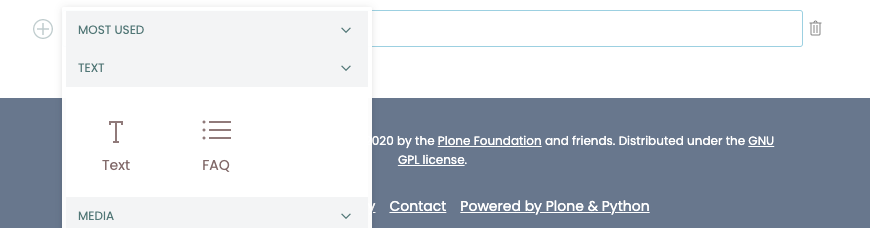
Restart the frontend, and now the FAQ block should be available.
See also
@rohberg/volto-accordion-block is a released add-on similar to the one from this chapter.