
25. Search block variation#
In this part you will:
Add more indexes and criteria
Create a search block variation
Topics covered:
block variation
Check out mastering-plone-project at tag upgrade_steps:
git checkout upgrade_steps
The code at the end of the chapter:
git checkout listing_variation
More info in The code for the training
We've already created a Custom search that lists all the talks, but it would be nice to improve it to show more information about each talk and allow filtering by additional facets. Let's add a variation of the search block to display talks with their event date, room, audience and speaker name. The result will look like this:
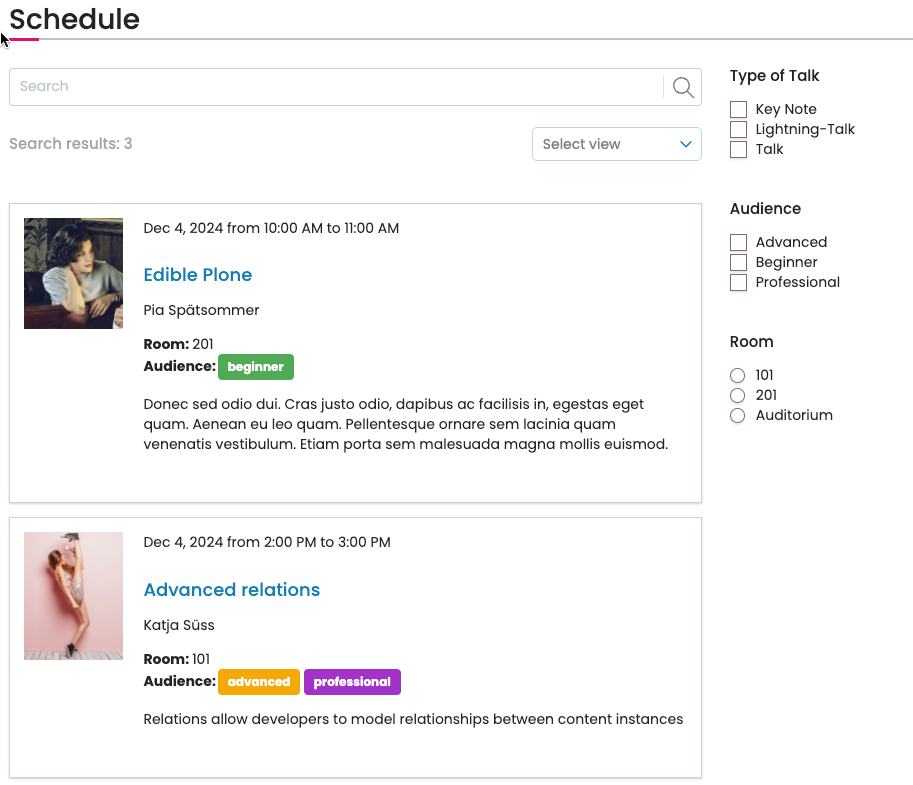
block variation for the search block to show more than title and description#
25.1. Add catalog indexes#
In order to add facets for the audience and room, we have to make sure they are indexed. We'll also add them as metadata columns so they are included in the search results data.
Update backend/src/ploneconf/site/profiles/default/catalog.xml.
<?xml version="1.0" encoding="utf-8"?>
<object name="portal_catalog">
  <index meta_type="BooleanIndex"
         name="featured"
  >
    <indexed_attr value="featured" />
  </index>
  <column value="featured" />

  <index meta_type="KeywordIndex"
         name="type_of_talk"
  >
    <indexed_attr value="type_of_talk" />
  </index>
  <column value="type_of_talk" />

  <index meta_type="FieldIndex"
         name="speaker"
  >
    <indexed_attr value="speaker" />
  </index>
  <index meta_type="KeywordIndex"
         name="audience"
  >
    <indexed_attr value="audience" />
  </index>
  <index meta_type="FieldIndex"
         name="room"
  >
    <indexed_attr value="room" />
  </index>

  <column value="speaker" />
  <column value="audience" />
  <column value="room" />

  <column value="level" />
  <column value="url" />
</object>
This adds new indexes for the three fields we want to show in the listing.
Note that audience is a KeywordIndex because the field is multi-valued, but we want a separate index entry for every value in an object.
While we're at it, we also added more metadata columns that we'll need in one of the next chapters.
We will need to search for sponsors and get the results with the values of the url and level fields.
We add a metadata column for these fields to avoid loading full content objects while searching. This would be okay, but slower. The search request gets an attribute from catalog brains unless the attribute is not available, then fetches the real object.
25.2. Add collection criteria#
The following additional criteria allow us to create a search block constrained to talks with facets to filter for audience, speaker and room.
backend/src/ploneconf/site/profiles/default/registry/querystring.xml
  <records interface="plone.app.querystring.interfaces.IQueryField"
           prefix="plone.app.querystring.field.speaker"
  >
    <value key="title">Speaker</value>
    <value key="enabled">True</value>
    <value key="sortable">True</value>
    <value key="operations">
      <element>plone.app.querystring.operation.string.is</element>
      <element>plone.app.querystring.operation.string.contains</element>
    </value>
    <value key="group"
           i18n:translate=""
    >Metadata</value>
  </records>

  <records interface="plone.app.querystring.interfaces.IQueryField"
           prefix="plone.app.querystring.field.audience"
  >
    <value key="title">Audience</value>
    <value key="enabled">True</value>
    <value key="sortable">False</value>
    <value key="operations">
      <element>plone.app.querystring.operation.selection.any</element>
      <element>plone.app.querystring.operation.selection.all</element>
      <element>plone.app.querystring.operation.selection.none</element>
    </value>
    <value key="group"
           i18n:translate=""
    >Metadata</value>
    <value key="vocabulary">ploneconf.audiences</value>
  </records>

  <records interface="plone.app.querystring.interfaces.IQueryField"
           prefix="plone.app.querystring.field.room"
  >
    <value key="title">Room</value>
    <value key="enabled">True</value>
    <value key="sortable">False</value>
    <value key="operations">
      <element>plone.app.querystring.operation.selection.any</element>
      <element>plone.app.querystring.operation.selection.all</element>
      <element>plone.app.querystring.operation.selection.none</element>
    </value>
    <value key="group"
           i18n:translate=""
    >Metadata</value>
    <value key="vocabulary">ploneconf.rooms</value>
  </records>
See also
For a full list of all existing QueryField declarations see plone/plone.app.querystring.
For a full list of all existing operations see plone/plone.app.querystring.
25.3. Add upgrade step#
A reinstallation of the add-on would leave the new catalog indexes empty. Therefore we write an upgrade step to not only add indexes and criteria, but also reindex all talks.
backend/src/ploneconf/site/profiles/default/metadata.xml:
<?xml version="1.0" encoding="utf-8"?>
<metadata>
  <version>1002</version>
  <dependencies>
    <dependency>profile-plone.volto:default</dependency>
    <dependency>profile-plone.app.caching:default</dependency>
    <dependency>profile-plone.app.caching:with-caching-proxy</dependency>
  </dependencies>
</metadata>
backend/src/ploneconf/site/upgrades/v1002.py:
from plone import api

import logging


logger = logging.getLogger(__name__)


def update_indexes(setup_tool):
    # Reindexing content
    for brain in api.content.find(portal_type=["talk", "sponsor"]):
        obj = brain.getObject()
        obj.reindexObject()
        logger.info(f"{obj.id} reindexed.")
backend/src/ploneconf/site/upgrades/configure.zcml:
<configure
    xmlns="http://namespaces.zope.org/zope"
    xmlns:genericsetup="http://namespaces.zope.org/genericsetup"
    >

  <genericsetup:upgradeSteps
      profile="ploneconf.site:default"
      source="1000"
      destination="1001"
      >
    <genericsetup:upgradeDepends
        title="Update types"
        description="Run the typeinfo import step"
        import_steps="typeinfo"
        />
    <genericsetup:upgradeStep
        title="Clean up site structure"
        description="Move talks to to their page"
        handler="ploneconf.site.upgrades.v1001.cleanup_site_structure"
        />
  </genericsetup:upgradeSteps>

  <genericsetup:upgradeSteps
      profile="ploneconf.site:default"
      source="1001"
      destination="1002"
      >
    <genericsetup:upgradeDepends
        title="Update catalog and querystring configuration"
        description="Run catalog and registry import steps"
        import_steps="catalog plone.app.registry"
        />
    <genericsetup:upgradeStep
        title="Reindex talks"
        description="Populate new indexes"
        handler="ploneconf.site.upgrades.v1002.update_indexes"
        />
  </genericsetup:upgradeSteps>

</configure>
Tip
From time to time you may want to reindex catalog indexes manually. To do so, go to http://localhost:8080/Plone/portal_catalog/manage_catalogIndexes, select the new indexes and click Reindex. You can also rebuild the whole catalog by going to the Advanced tab and clicking Clear and Rebuild. This can take some time in a large site!
25.4. Create a search block for talks#
As soon as you run the upgrade steps, you can now add a search block to your 'schedule' page that provides facets to filter for audience, et cetera.
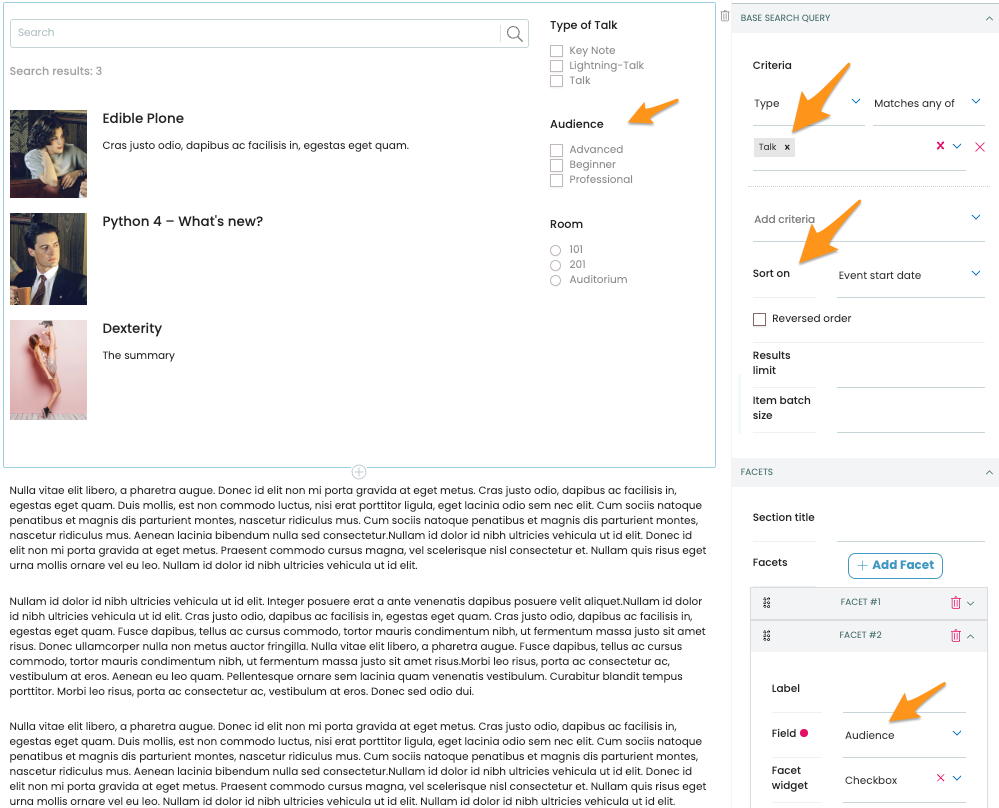
search block#
25.5. Create and register a new block variation#
Some blocks can be enhanced with variations of their layout. We are writing a block variation for the search block.
First, create a new component frontend/packages/volto-ploneconf-site/src/components/variations/TalkListingBlockVariation.jsx by copying the code of an existing block variation, frontend/core/packages/volto/src/components/manage/Blocks/Listing/SummaryTemplate.jsx.
 1import PropTypes from 'prop-types';
 2import ConditionalLink from '@plone/volto/components/manage/ConditionalLink/ConditionalLink';
 3import Component from '@plone/volto/components/theme/Component/Component';
 4import { When } from '@plone/volto/components/theme/View/EventDatesInfo';
 5
 6import { flattenToAppURL, isInternalURL } from '@plone/volto/helpers/Url/Url';
 7
 8const colorMapping = {
 9  beginner: 'green',
10  advanced: 'yellow',
11  professional: 'purple',
12};
13
14const SummaryTemplate = ({ items, linkTitle, linkHref, isEditMode }) => {
15  let link = null;
16  let href = linkHref?.[0]?.['@id'] || '';
17
18  if (isInternalURL(href)) {
19    link = (
20      <ConditionalLink to={flattenToAppURL(href)} condition={!isEditMode}>
21        {linkTitle || href}
22      </ConditionalLink>
23    );
24  } else if (href) {
25    link = <a href={href}>{linkTitle || href}</a>;
26  }
27
28  return (
29    <>
30      <div className="items">
31        {items.map((item) => (
32          <div className="listing-item" key={item['@id']}>
33            <ConditionalLink item={item} condition={!isEditMode}>
34              <Component componentName="PreviewImage" item={item} alt="" />
35              <div className="listing-body">
36                <When
37                  start={item.start}
38                  end={item.end}
39                  whole_day={item.whole_day}
40                  open_end={item.open_end}
41                />
42                <h3>{item.title || item.id}</h3>
43                <p>{item.speaker}</p>
44                <p>
45                  {item.room && (
46                    <>
47                      <b>Room: </b>
48                      {item.room}
49                      <br />
50                    </>
51                  )}
52                  {item.audience?.length > 0 && (
53                    <>
54                      <b>Audience:</b>
55                      {item.audience?.map((audience) => {
56                        let color = colorMapping[audience] || 'green';
57                        return (
58                          <div className={`ui label ${color}`} key={audience}>
59                            {audience}
60                          </div>
61                        );
62                      })}
63                    </>
64                  )}
65                </p>
66                <p>{item.description}</p>
67              </div>
68            </ConditionalLink>
69          </div>
70        ))}
71      </div>
72
73      {link && <div className="footer">{link}</div>}
74    </>
75  );
76};
77
78SummaryTemplate.propTypes = {
79  items: PropTypes.arrayOf(PropTypes.any).isRequired,
80  linkMore: PropTypes.any,
81  isEditMode: PropTypes.bool,
82};
83
84export default SummaryTemplate;
We register our new variation in config.blocks.blocksConfig.listing.variations.
(Listing blocks and search blocks share their variations via this setting.)
Update frontend/packages/volto-ploneconf-site/src/config/settings.ts:
 1import type { ConfigType } from '@plone/registry';
 2import type { BlockExtension, ViewsConfig } from '@plone/types';
 3import TalkView from '../components/Views/TalkView';
 4import TalkListingBlockVariation from '../components/variations/TalkListingBlockVariation';
 5
 6export default function install(config: ConfigType) {
 7  // Language settings
 8  config.settings.defaultLanguage = 'en';
 9  // Additional language settings for Volto 19 and above, add as many supported languages as needed
10  // Languages not added to supportedLanguages will not be included in the build
11  // config.settings.supportedLanguages = ['en'];
12
13  config.views = {
14    ...(config.views as ViewsConfig),
15    contentTypesViews: {
16      ...config.views.contentTypesViews,
17      talk: TalkView,
18    },
19  };
20
21  config.blocks.blocksConfig.listing.variations = [
22    ...(config.blocks.blocksConfig.listing.variations as BlockExtension[]),
23    {
24      id: 'talks',
25      title: 'Talks',
26      template: TalkListingBlockVariation,
27    },
28  ];
29
30  return config;
31}
Now select the new variation to apply it to the search block.
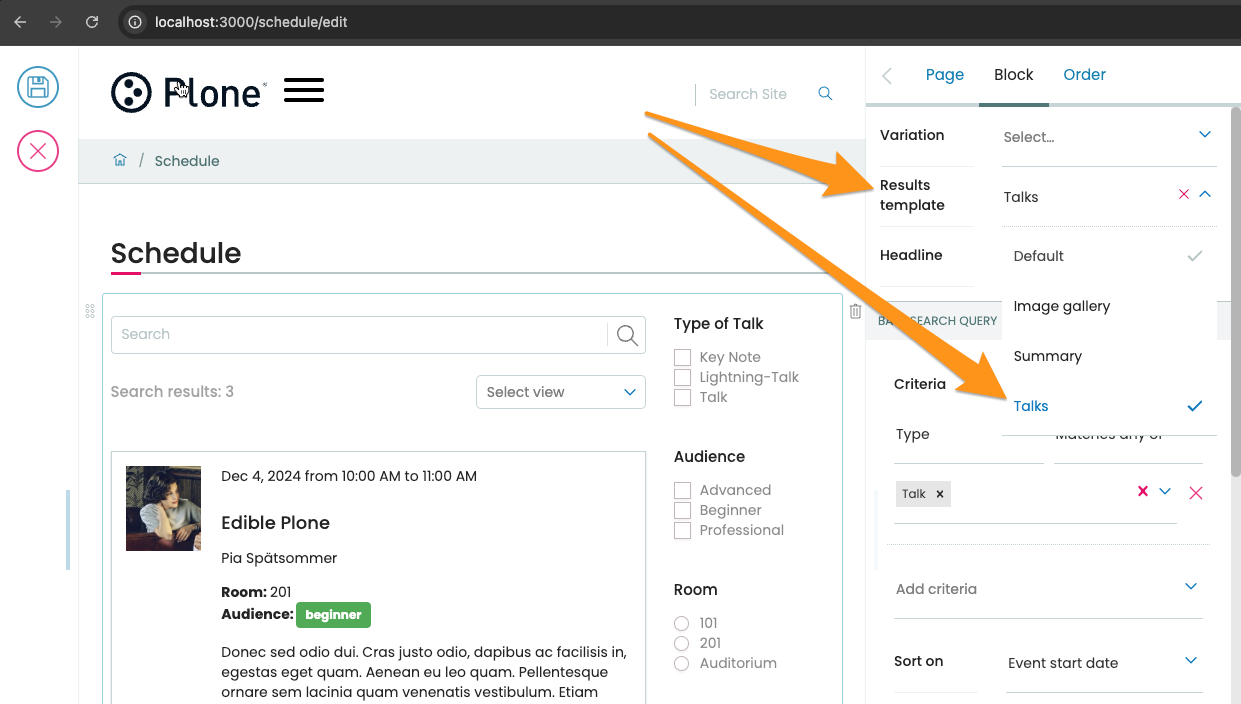
Apply listing variation#
This is a basic block variation. See Block extensions mechanism for advanced techniques.